Quick answer
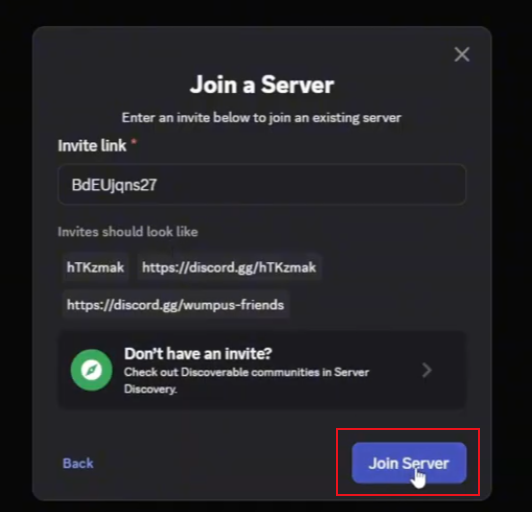
BdEUjQns27 is the invite for a small fan-run My Timber Pets Discord (561 members, created August 2026), not the official WingBrain / Gusnek Studios server. The only official community is the WingBrain Roblox group (620792404, 232,400 members) at https://www.roblox.com/share/g/620792404 — a Roblox group, not a Discord. To join the fan Discord: open Discord → tap '+' in the left sidebar → 'Join a Server' at the bottom of the next modal → paste BdEUjQns27 → click 'Join Server'. No official Discord exists, so this fan server is the only Discord invite we can publish, with that caveat made explicit.
In-game screenshots
Current build screenshots
Why join the Discord
For a Roblox tycoon like My Timber Pets, the Discord is usually where patch notes and event posts land first — often ahead of the Updates tracker or any official Roblox feed. The [🎣] fishing update that pushed the title on 2026-09-07 was most likely announced in this Discord, so joining is the fastest way to catch the next fishing window or any new mechanic the Roblox listing does not describe.
- Event announcements ([🎣] fishing, future updates) typically post in #announcements first.
- Patch notes and balance changes often appear before the public Roblox description updates.
- Community trade help, roll advice and rare-pet channels.
- Direct visibility into whether a new code drops — the Codes page only reflects official Roblox metadata.
Step-by-step: how to join
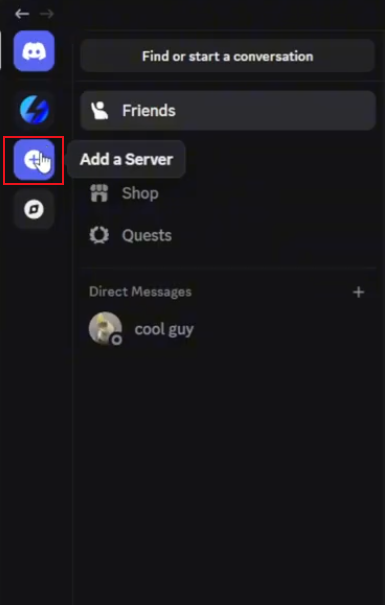
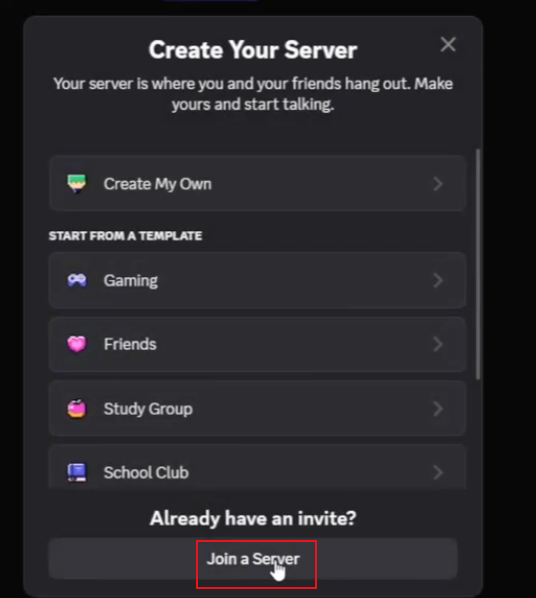
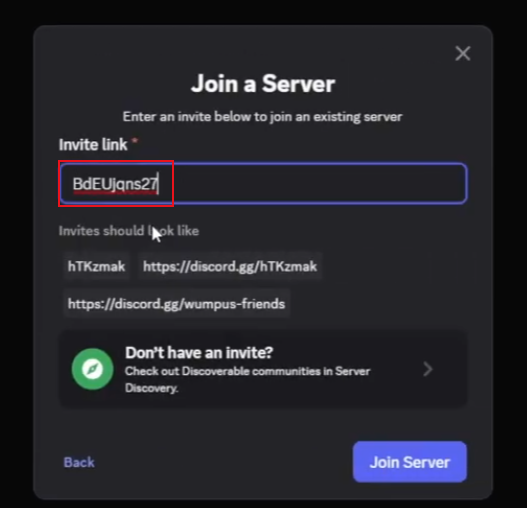
The join flow is the same on desktop and mobile: '+' → 'Join a Server' → paste invite → 'Join Server'. The invite field accepts either a short code (BdEUjQns27) or a full https://discord.gg/BdEUjQns27 URL.
- 1
Open the Discord app on desktop or mobile (free at discord.com).
- 2
In the left sidebar, tap the '+' button (Add a Server).
- 3
In the 'Create Your Server' modal that opens, scroll to the bottom and tap 'Join a Server' under 'Already have an invite?'.
- 4
In the 'Join a Server' dialog, paste the invite code BdEUjQns27 (or the full link https://discord.gg/BdEUjQns27).
- 5
Click 'Join Server' to confirm.
What is actually behind the invite: a fan community, not the official server
Once joined, the server that opens is small and recently created. The welcome widget lists 100 of 561 members online, a creation date of August 2026, and a six-channel layout (rules, verifications, arrivals, boosters, dont-post-here, community-announcements) — the standard Discord onboarding template, not a creator-run channel tree. The server header carries no WingBrain or Gusnek Studios verified tag, no official badge, and the widget's 'ROBLOX' line is just the Discord–Roblox game integration, not a creator partnership signal.
For comparison, the linked WingBrain Roblox group is at 232,400 members — three orders of magnitude larger. A 561-member Discord created last month is not that group. The invite still works and the server is themed around My Timber Pets, but the people running it are fans, not the studio. We list this explicitly so the gap is not buried.
- Server size: 561 members, 100 online (welcome widget, 2026-09-08).
- Server age: created August 2026, roughly one month old at capture.
- Channel tree: rules, verifications, arrivals, boosters, dont-post-here, community-announcements — no #updates, no #codes, no #events.
- Verified tag: none. No WingBrain / Gusnek Studios ownership indicator in the server header.
- Scale gap: WingBrain Roblox group is 232,400 members — this Discord is 0.3% of that size.
- Official hub: the only official community is the WingBrain Roblox group (620792404) at https://www.roblox.com/share/g/620792404 — a Roblox group, not a Discord.
- Group perk: joining the WingBrain Roblox group grants free cash every 10 minutes (observed in a high-view gameplay video, 2026-09-08) — a concrete reason to use the official community directly, independent of the fan Discord.
- Conclusion: fan community, not the official creator Discord. There is no official Discord; treat posts as community-issued, not authoritative.
What to look for once you are in
Pin #community-announcements — that is the only announcement channel the server currently exposes. If the [🎣] fishing event is posted at all, it lands there. Search the channel for '[🎣]' or 'fishing' if you joined after 2026-09-07. There is no dedicated #codes channel, so any code drops would be a single post in #community-announcements, if at all.
- Pin #community-announcements — the only announcement channel the server exposes.
- No #codes channel — any code post would be a single message in #community-announcements.
- No #events or #fishing channel — community discussion only.
- Cross-check any code or patch claim with the Roblox listing or the Codes / Updates pages before redeeming or trusting it.
Coverage gaps that still need filling
Two things stay open after this update. The official creator Discord has not been found, and the [🎣] fishing event has not been seen posted in this fan server.
- Whether the [🎣] fishing event is actually posted in the fan server's #community-announcements channel — the channel is the only place it would land, and a direct check is still pending.
- Whether the WingBrain Roblox group description (620792404, 232,400 members) or the developer's social posts ever link to an official Discord — current knowledge says the only official community is the Roblox group.
- Whether the in-game [🎣] UPDATE signboard (seen 2026-09-07) ever points players to a Discord at all.
- WingBrain Roblox group 'Forums → Ajuda e suporte' (Help and support) sub-forum, checked 2026-09-08: only bug reports (pets vanishing after purchase, animal roll load delays), account-ban complaints, and general feedback — no [🎣] fishing announcement. The group's 'Events' tab and other sub-forums are still unchecked.
- WingBrain Roblox group 'Forums → Feedback' sub-forum, checked 2026-09-08: only player feature requests (auto-roll auto-buy, backpack sorting) and an Xbox cursor bug — all from regular Members, no WingBrain staff replies, no [🎣] fishing announcement. The 'Forums' tab is unlikely to carry the official [🎣] post; the sub-forums checked so far are player-to-player, not developer-run.
- The top-nav 'Events' tab on the WingBrain Roblox group was checked 2026-09-08 and is empty ('No events for now / Check back later for new events') — the official channel has no public [🎣] event post. 'Forums → Discurssões gerais' (General discussions) and the 'About' tab (which may carry a current group shout) are still unchecked, but with Events empty, the probability of an official [🎣] post landing on this Roblox group is now low.
Source standard
Official Roblox metadata and creator-owned descriptions take priority. Exact values remain marked unverified until they can be reproduced in the current public build.
Common questions
My Timber Pets FAQ
Is the My Timber Pets Discord official?
No. The server behind invite BdEUjQns27 is a fan community, not the official WingBrain / Gusnek Studios server. It has 561 members, was created in August 2026, has no verified tag in the header, and the only announcement channel is #community-announcements. The official creator Discord (if one exists) has not been identified.
Can I trust announcements or codes posted in this Discord?
Treat them as community-issued, not authoritative. There is no #codes channel and no verified creator tag, so any code or patch claim should be cross-checked with the official Roblox listing or the Codes / Updates pages on this site before redeeming or acting on it.
How do I redeem the invite?
Open Discord, tap '+' in the left sidebar, choose 'Join a Server' at the bottom of the next modal, paste BdEUjQns27 (or https://discord.gg/BdEUjQns27), then click 'Join Server'. The flow is identical on desktop and mobile.
Will the [🎣] fishing event be posted there?
Most likely yes — Roblox tycoon patch notes are typically posted to Discord first. Check the #announcements or #updates channel once joined; if you joined after 2026-09-07, search the channel for '[🎣]' or 'fishing'.
Do I need to pay to join?
No. Discord itself is free and the invite BdEUjQns27 grants free access; no payment, Robux purchase, or external link is required.
Where else can I check for new codes besides the Discord?
The Codes page on this site is updated daily from official Roblox metadata. For community-discovered codes the Discord is faster, but always cross-check with the Roblox listing before redeeming — we only publish what the public source confirms.