Quick answer
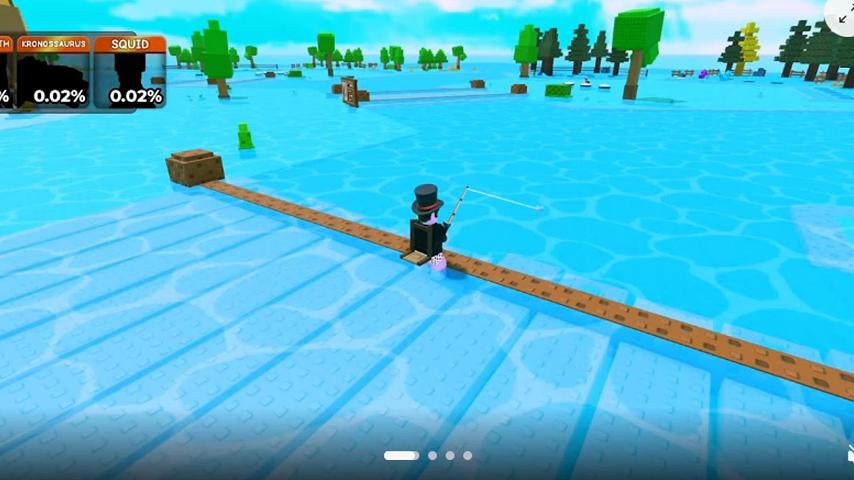
Fishing is a [🎣] event confirmed live on 2026-09-07. During the window a rod sat in hotbar slot 1, a '2x Luck, All traits, All Exclusives' buff was active, and the event showcased ICE MAMMOTH, KRONOSAURUS and SQUID at 0.02% each. A countdown was observed at 05:49, but its meaning is unverified: it is more likely a per-cast cooldown or round timer than the full event length, since a five-minute fishing event is unlikely. Whether fishing stays available after the timer reaches zero is still unconfirmed. The creator made no public announcement for the event — the WingBrain Roblox group Events tab is empty and no official Discord exists — so the 2026-09-07 in-game capture is the only direct proof the event ran.
In-game screenshots
Current build screenshots
What the fishing event was
The official Roblox title changed to [🎣] My Timber Pets! on 2026-09-07, and an in-game capture from that day confirms fishing was a real live event, not only a title signal. A world 'UPDATE' sign marked the active event, and a fish icon with a countdown appeared in the bottom-left of the interface.
- Creator: the WingBrain group (Gusnek Studios), same as the base experience.
- Trigger: the [🎣] title deployment on 2026-09-07.
- Evidence: a current-build capture on 2026-09-07, not a creator changelog.
How the event was announced (silent deployment)
Despite being a live, in-game event on 2026-09-07, the [🎣] fishing update received no public announcement from the creator. The WingBrain Roblox group (620792404, 232,400 members) — the only official community — was checked 2026-09-08 and showed no [🎣] post: the Events tab is empty ('No events for now'), the 'Ajuda e suporte' and 'Feedback' forum sub-forums carry only player posts with no developer replies, and there is no active group shout. No official Discord exists. The 2026-09-07 in-game capture on this page is therefore the only direct proof the event existed — WingBrain shipped it as a silent deployment.
- Roblox group Events tab: empty (checked 2026-09-08).
- Roblox group Forums sub-forums (Help/Support, Feedback): player posts only, no WingBrain staff replies, no [🎣] post.
- No active group shout and no official Discord invite.
- Consequence: the fishing event is deployed in-game but unannounced — treat any third-party 'schedule' claims as unverified.
How to start (while the event is live)
The exact cast or reel input was not captured, so the precise button or mini-game that lands a catch stays unverified. The rod was already present in the hotbar during the window, so no separate purchase or NPC interaction was observed.
- 1
Wait until the [🎣] event is active. If no rod is in hotbar slot 1 and no fish-icon countdown shows bottom-left, the event is not currently running.
- 2
Equip the fishing rod, which occupies hotbar slot 1 during the event. Use key 1 on keyboard, or tap the rod icon on mobile.
- 3
The bottom-left fish icon plus the countdown is the fishing timer. Its exact meaning — event close versus a per-cast cooldown — is not yet confirmed.
- 4
The 'UPDATE' sign in the world center confirms the event is online.
The luck buff during the event
While the event ran, a buff banner read '2x Luck, All traits, All Exclusives'. That means luck was doubled for the duration, and the catch pool included every trait tier and every Exclusive pet, which is broader than the normal roll pool.
- 2x Luck: doubled odds during the event window.
- All traits: the full trait tier range was eligible.
- All Exclusives: Exclusive pets were part of the pool.
The headline catches
The event showcase listed three top catches at 0.02% each: ICE MAMMOTH, KRONOSAURUS and SQUID. These match the top-tier pets already listed on the Pets page, which strengthens the read that fishing was a route to the rarest animals during the window. A player post on the WingBrain Roblox group (WynnDy28, 2026-09-06) independently corroborates this: 'I also got the new pets, but only the squid and the other one, I didn't get the ice…' — Squid was dropping from the pool while Ice Mammoth was not yet pulled, which lines up with the 0.02% showcase odds.
- ICE MAMMOTH — 0.02% (event showcase). No player catch report seen yet.
- KRONOSAURUS — 0.02% (event showcase). No player catch report seen yet.
- SQUID — 0.02% (event showcase). Player WynnDy28 (2026-09-06) confirmed a Squid drop.
- This is the event's headline pool, not a complete odds table.
The countdown timer (meaning unverified)
The bottom-left countdown was observed at 05:49. A five-minute fishing event is unlikely for a Roblox tycoon, so 05:49 is probably a per-cast cooldown or a round timer rather than the whole event window. One capture showed the fishing HUD clear when the timer hit zero, but that may simply be the between-casts idle state (many fishing mini-games hide their UI when not actively casting) rather than the feature shutting down. The true meaning of the timer, and whether fishing persists after it reaches zero, are both unverified.
- Observed countdown: 05:49 at capture time.
- Reading A (less likely): the full event length, ending when it hits zero.
- Reading B (more likely): a per-cast cooldown or round timer, with the HUD hiding between casts.
- Open question: does the rod and fishing stay available after the timer reaches zero? Not yet confirmed.
Official creator walkthrough video
The creator's official guide recording (guide.mp4, in /videos/Guide/) includes fishing footage, making it a creator-owned primary source for how the rod and event look in motion. It complements the 2026-09-07 in-game capture on this page; the video is the only creator-produced fishing material found so far, since the Roblox group and the silent deployment left no written explanation.
- Source: /videos/Guide/guide.mp4 — the official My Timber Pets guide recording (creator-owned).
- Contains: live fishing visuals (rod, water, catch flow) shown by the creator.
- Visual proof: the official guide cover (a fishing frame cut from the video) now serves as this page's hero image.
- Caveat: the video is a walkthrough, not a changelog, so it shows the look of fishing but not confirmed odds or timer rules.
- Also featured: the full walkthrough is embedded at the top of the home page.
What we could not verify
The event closed before several details could be captured. None of the following are published as fact; they are listed as gaps to fill if the event returns or a creator note appears.
- What the 05:49 countdown measures: event close, a per-cast cooldown, or a round timer.
- Whether the rod and fishing stay available after the timer reaches zero.
- The exact cast or reel interaction (button, hold, mini-game or auto).
- Where the fishing spot is (a water body already in view, or a specific dock/area).
- What a catch yields: a pet directly, a fish currency, or a sell-all flow.
- Whether the rod can be upgraded, and whether any Robux rod tiers exist.
- The full catch table and odds beyond the three 0.02% headline pets.
- The next return date or whether the event repeats on a schedule.
Source standard
Official Roblox metadata and creator-owned descriptions take priority. Exact values remain marked unverified until they can be reproduced in the current public build.
Common questions
My Timber Pets FAQ
Is fishing in My Timber Pets permanent?
It is an event rather than a confirmed permanent mode, but its exact duration is not yet verified. A 05:49 countdown was observed and the HUD cleared at zero in one capture, yet that may be a per-cast cooldown or between-casts idle state rather than the event ending. Whether fishing stays available after the timer hits zero is still unconfirmed.
How do I start fishing?
Only while the event is live. Equip the rod in hotbar slot 1 (key 1 on keyboard, or tap the rod icon). The exact cast or reel input was not captured, so confirm it in your own client during the next window.
What can you catch while fishing?
The event showcased ICE MAMMOTH, KRONOSAURUS and SQUID at 0.02% each as the headline catches, with a '2x Luck, All traits, All Exclusives' buff active. The full catch table was not captured.
When does the fishing event return?
The return date is unverified. Watch the official [🎣] title and the Updates tracker; this page is updated when a current build or creator note confirms the next window.